

Home page sections
Hotspot image
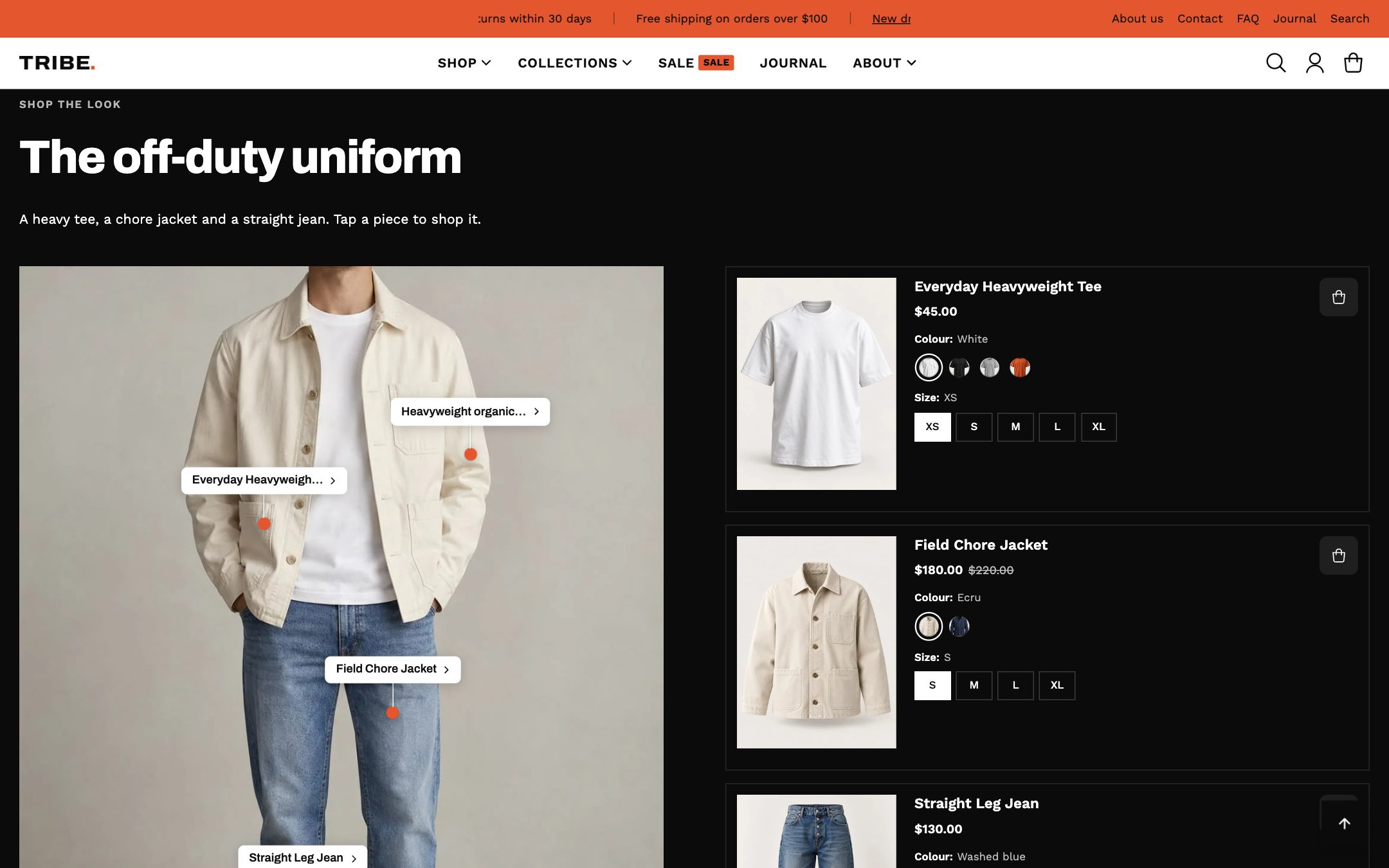
Shop the look: a photo with clickable hotspots on products, plus an optional product list with options and an Add all to cart button.
Tips
- Place hotspots by dragging the position sliders, and check them on a phone.
- The product list follows the product card image shape from Theme settings → Product card.
- Turn on the bundle option to show a total price and one button that adds every product.
Settings
Section width
| Setting | What it does |
|---|---|
| WidthDropdown | Full widthDefaultCustom width |
| Custom widthSlider | Shown only when it applies to the options chosen above. |
Color scheme
| Setting | What it does |
|---|---|
| Use the store's default color schemeToggle | Toggle |
| Color schemeColour scheme | Shown only when it applies to the options chosen above. |
Section header
| Setting | What it does |
|---|---|
| SubheadingText | Text |
| HeadingText | Text |
| DescriptionRich text | Rich text |
| Heading sizeDropdown | H1 — largestH2 — mediumH3 — small |
| Text alignmentDropdown | LeftCenterRight |
Layout
| Setting | What it does |
|---|---|
| Layout styleDropdown | Full width imageSplit — image and product list side by side |
| Image positionDropdown | LeftRight Shown only when it applies to the options chosen above. |
| Column gapSlider | Shown only when it applies to the options chosen above. |
| Reverse layout on mobileToggle | Toggle |
Image
| Setting | What it does |
|---|---|
| Desktop imageImage | Image |
| Mobile imageImage | Optional. Falls back to the desktop image if not set. |
| Image aspect ratioDropdown | Adapt to image1:1 (square, cropped)3:4 (portrait)4:3 (landscape)16:9 (wide) |
| Image focal pointDropdown | CenterTopBottomLeftRight |
Hotspot style
| Setting | What it does |
|---|---|
| Icon styleDropdown | Plus iconDotCustom icon |
| Custom icon imageImage | Used when icon style is set to Custom icon.Shown only when it applies to the options chosen above. |
| Icon sizeDropdown | SmallMediumLarge |
| Icon colorColour | Colour |
| AnimationDropdown | PulseStaticBlink |
| Name tagsDropdown | Shows the name beside each marker. All screensDesktop onlyOff |
Tooltip settings
| Setting | What it does |
|---|---|
| Open tooltip onDropdown | HoverClick |
| Tooltip styleDropdown | Minimal — name and price onlyCard — image, name, price and buttonExtended — image, name, price, rating and button |
| Tooltip positionDropdown | Auto (detect viewport edges)TopBottomLeftRight |
Product list
Only shown in split layout.
| Setting | What it does |
|---|---|
| Show product list alongside imageToggle | Shown only when it applies to the options chosen above. |
| Number of products to showSlider | Shown only when it applies to the options chosen above. |
| Highlight active product on clickToggle | Shown only when it applies to the options chosen above. |
| Show add all to cartToggle | Customers pick options on each card, then add the whole set.Shown only when it applies to the options chosen above. |
Mobile view
| Setting | What it does |
|---|---|
| Image height on mobileSlider | Slider |
Spacing
| Setting | What it does |
|---|---|
| Top paddingSlider | Slider |
| Bottom paddingSlider | Slider |
Blocks
Blocks are the pieces you add, remove and reorder inside the section, under Add block.
Product hotspot
| Setting | What it does |
|---|---|
| Horizontal positionSlider | Slider |
| Vertical positionSlider | Slider |
| ProductProduct | Product |
Text hotspot
| Setting | What it does |
|---|---|
| Horizontal positionSlider | Slider |
| Vertical positionSlider | Slider |
| HeadingText | Text |
| DescriptionText | Trimmed to 160 characters so the card cannot cover the image. |
| Button labelText | Appears once a link is set below. |
| Button linkLink | Shown only when it applies to the options chosen above. |
| Button styleDropdown | PrimaryOutlineText only Shown only when it applies to the options chosen above. |