

Feature guides
Complete the look
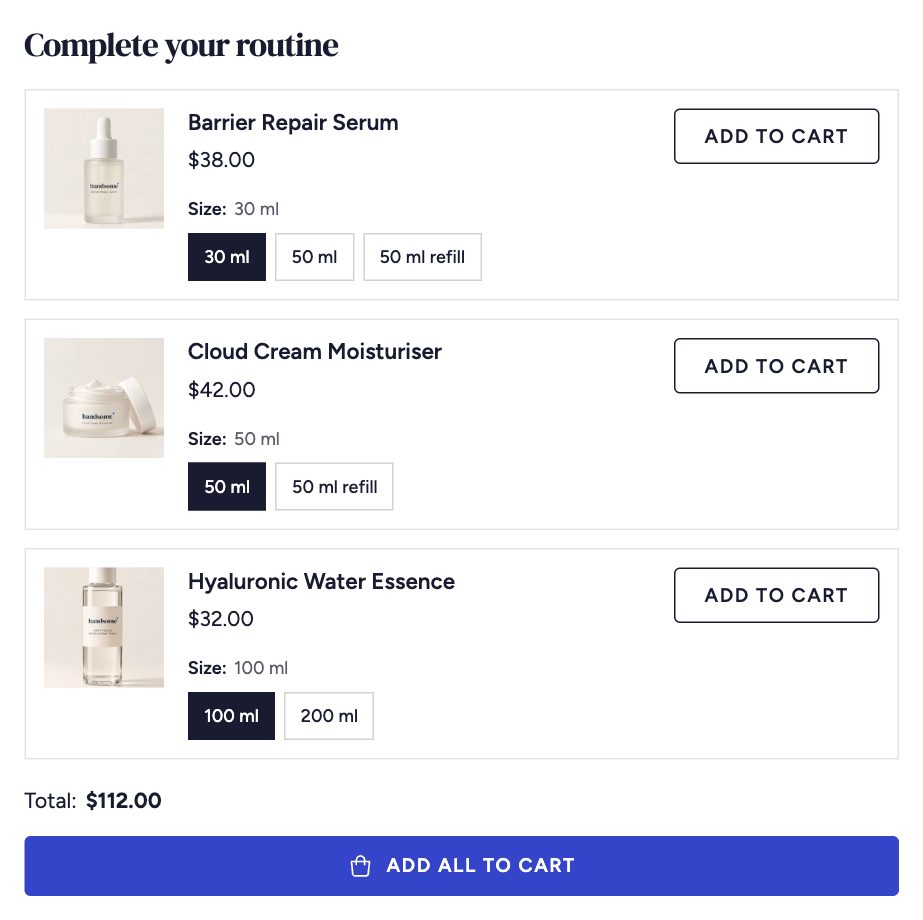
Show products that go with the one being viewed, such as a cleanser with a moisturiser or a ring with matching earrings, and let shoppers add them all at once.
1. Choose the pairings
Pairings are set in Shopify's free Search & Discovery app, so they work in any theme.
- Open Search & Discovery → Product recommendations.
- Search for a product and open it.
- Under Complementary products, add the products that go with it, in order of importance.
- Save, and repeat for your main products.
Shopify can take a few minutes to start showing new pairings.
2. Add the block to the product page
- In the theme editor, open a product and select the Product section.
- Click Add block → Complementary products.
- Set a heading such as Complete the look or Pairs well with, and how many products to show.
- Turn on Show combined price and Show add all button to sell the set together.
The block hides itself on products that have no pairings, so you can add it to the template once.
Related products
The Related products section is different: Shopify chooses those automatically from your sales data and product details. Use both together for the strongest product page.